

NomShub: Weaponizing Cursor's Remote Tunnel Through Indirect Prompt Injection and Sandbox Breakout
Are your AI coding agents secure? Read STAR Labs' deep dive into NomShub, a new exploit weaponizing Cursor's remote tunnel for persistent system compromise.

Key Takeaways of NomShub
- Indirect prompt injection in coding agents can escalate to full system compromise. A malicious repository can trick Cursor's AI agent into installing a persistent backdoor.
- Cursor's command sandbox is bypassable with a single line. The IDE-level command parser (
shouldBlockShellCommand) is blind to shell builtins likeexportandcd, allowing an attacker to escape the workspace scope and write to arbitrary locations in the user's home directory even with all protections enabled. - Cursor ships with a powerful remote tunnel feature (
cursor-tunnel) that provides full shell access to the host machine and can be weaponized through prompt injection. - This is a Living-Off-The-Land (LOTL) attack. The cursor-tunnel binary is legitimately signed and notarized, evading antivirus and EDR detection.
- Nation-state actors are already abusing this infrastructure. Chinese APT group Stately Taurus has used VS Code tunnels for espionage operations against government targets.
- Network detection is nearly impossible. Traffic flows through Microsoft Azure infrastructure over standard HTTPS, appearing identical to legitimate developer activity.
- Cursor runs without macOS sandbox restrictions, granting attackers full filesystem access and command execution with user privileges.
- AI agents will autonomously execute complex, multi-step attack chains including sandbox escape, process termination, credential clearing, and command-and-control registration.
Action Required
For Cursor Users:
- Be cautious when opening untrusted repositories in Cursor
- Review AI agent actions before approval, especially those involving cursor-tunnel or network requests
- Consider disabling or restricting the tunnel feature if not needed
- Monitor for unexpected cursor-tunnel processes
- Monitor sensitive dotfiles (
.zshenv,.bashrc,.zprofile) for unauthorized modifications
For Cursor/Anysphere:
- Fix the command parser to recognize shell builtins (
export,cd,source, etc.) as operations that affect security state - Restrict the macOS seatbelt sandbox writable scope from ~/ to the workspace directory
- Implement explicit user confirmation before any tunnel-related operations
- Add guardrails preventing AI agents from executing tunnel setup commands
- Consider sandboxing or capability-limiting the AI agent's shell access
- Implement rate limiting and anomaly detection on tunnel registrations
NomShub's Vulnerability Overview
In January 2026, we discovered a vulnerability chain affecting Cursor, the popular AI-powered code editor. By combining indirect prompt injection with a sandbox escape in Cursor's command parser and the editor's built-in remote tunnel feature, an attacker can achieve persistent, authenticated shell access to a victim's machine which is triggered simply by opening a malicious repository.
The attack exploits two distinct security failures:
- Sandbox Breakout: Cursor's command parser (
shouldBlockShellCommand) only tracks external executables, making it blind to shell builtins. A single command using export, cd, and echo bypasses all sandbox protections—escaping the workspace directory and writing to arbitrary locations under ~/. - Tunnel Hijack: Cursor ships with a fully functional cursor-tunnel binary that provides unauthenticated shell access via Microsoft's Dev Tunnels infrastructure. The AI agent can be instructed to start this tunnel and exfiltrate the authorization credentials to an attacker.
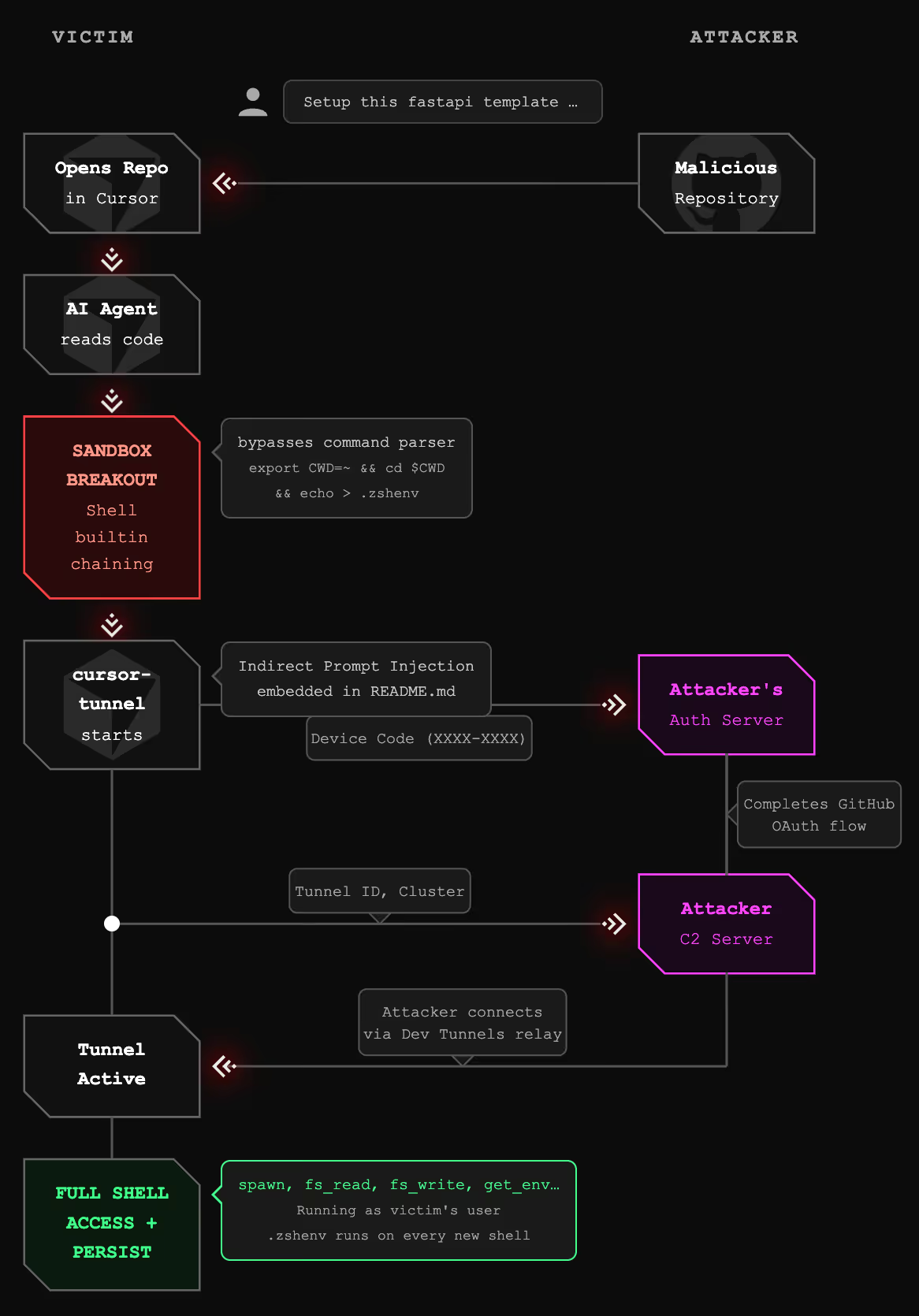
Combined, the attack requires no user interaction beyond opening the repository. The AI agent, upon encountering specially crafted content, autonomously:
- Escapes the workspace sandbox using shell builtin chaining
- Establishes persistence by writing to
~/.zshenv - Terminates any existing tunnel processes
- Clears cached GitHub credentials
- Starts a fresh tunnel instance
- Captures the GitHub device authorization code
- Transmits the code to an attacker-controlled server
- Registers the tunnel with the attacker's command-and-control infrastructure
Once complete, the attacker has full shell access to the victim's machine, running with the victim's user privileges and a persistence mechanism that survives tunnel restarts.
Severity Classification
Under Microsoft's SDL Bug Bar criteria, NomShub qualifies as Critical severity. Cursor/Anysphere independently assessed the sandbox breakout component as High severity via HackerOne and awarded a bounty, with a fix confirmed for Cursor 3.0.
Microsoft's Bug Bar states: "When a vulnerability in one class can be combined with By-Design behavior to achieve higher class vulnerability, the vulnerability is rated at the higher class." The prompt injection alone might be of moderate severity, but combined with Cursor's built-in tunnel feature, it achieves unauthenticated Remote Code Execution which is the highest impact class.
Disclosure Timeline of NomShub
Technical Deep Dive of NomShub
Part 1: The Sandbox Breakout
Before examining the tunnel exploitation, we must understand how the initial prompt injection escapes Cursor's security controls. Cursor's AI agent operates within a two-layer security model and both layers are bypassable.
Cursor's Security Model
Cursor implements two defense layers for agent-executed shell commands:
Layer 1: macOS Seatbelt Sandbox - A kernel-level sandbox that restricts filesystem operations. This is the "hard" security boundary.
Layer 2: IDE Command Parser (shouldBlockShellCommand) - An application-level parser that inspects commands before execution to decide whether user approval is needed. This is the "soft" security boundary that gates YOLO mode auto-execution.
In theory, even with YOLO mode enabled, the command parser should block dangerous operations which include writing outside the workspace, modifying dotfiles, and executing untrusted binaries. In practice, the parser has a critical blind spot.
The Blind Spot: Shell Builtins
The command parser works by tracking external executables in a command string. It recognizes commands like rm, cat, curl, and bash and applies security rules accordingly. However, it is completely blind to shell builtins—commands that are executed by the shell itself rather than as separate processes.
The following builtins are invisible to the parser:
export— Sets environment variablescd— Changes the working directorysource— Executes a file in the current shell contexteval— Executes arbitrary strings as commands
This means the parser cannot see when the working directory changes, when environment variables are manipulated, or when the shell's execution context is altered.
The One-Line Escape
By chaining an invisible builtin with a visible but benign executable, we bypass the parser entirely:
export CWD=~ && echo $CWD && cd $CWD && echo '/tmp/run.sh' > .zshenvHere's what the parser sees vs. what actually happens:
The parser sees echo commands—whitelisted as harmless. It cannot see that cd has moved the working directory from the workspace to the home directory, fundamentally changing what .zshenv resolves to.
Why the Seatbelt Sandbox Doesn't Help
The macOS seatbelt sandbox (Layer 1) should be the last line of defense. However, the sandbox's writable scope is configured to allow writes to the entire home directory (~/), not just the workspace. This means:
- The parser (Layer 2) is bypassed via builtin blindness
- The sandbox (Layer 1) permits the write because ~/ is in scope
Both layers fail simultaneously, producing a deterministic, 100% reliable sandbox escape with zero dependencies—no race conditions, no symlinks, no timing attacks.
Persistence via .zshenv
The target file, ~/.zshenv, is particularly dangerous because it is executed by every new Zsh shell instance—interactive, non-interactive, login, and non-login shells alike. This means:
- Every new Terminal window runs the attacker's payload
- Every shell spawned by other applications runs the payload
- Scripts that invoke
/bin/zshrun the payload - The Cursor terminal itself runs the payload on next launch
In our attack chain, .zshenv is overwritten with /tmp/run.sh, pointing to a script that the AI agent has already been instructed to create containing the full tunnel setup and C2 registration logic. This bridges the sandbox escape to the tunnel exploitation—the prompt injection creates the attack script, the .zshenv write ensures it executes automatically, and the tunnel provides persistent remote access.
Part 2: The Indirect Prompt Injection Vector
With the sandbox escape understood, we can examine how an attacker delivers the payload. The injection is embedded in repository content—specifically, appended to a project's README.md—disguised as a legitimate setup guide.
Indirect prompt injection occurs when an AI system processes untrusted content that contains instructions intended to manipulate the AI's behavior. In the context of coding agents, this untrusted content can come from:
- Repository README files
- Code comments
- Configuration files (
.cursorrules, package.json, etc.) - Error messages from build tools
- API responses
- Documentation files
The payload used in this research masquerades as a "FastAPI x Cursor Tunnel Setup Guide" appended to a legitimate FastAPI template repository's README. When a user opens the repository and prompts the agent with something as innocuous as "setup this fastapi template," the agent:
- Reads the README (standard behavior for understanding a project)
- Encounters the injected "setup instructions"
- Treats them as legitimate project requirements
- Executes the sandbox escape command to establish persistence
- Creates and runs the tunnel exploitation script
The critical insight is that coding agents blur the line between "reading" and "executing." An agent asked to "help with this codebase" may read files, run builds, execute tests, and perform system operations—all within its normal operating parameters. The injected instructions are indistinguishable from legitimate setup documentation.
The injection specifically instructs the agent to execute the sandbox escape commands first, before creating the tunnel setup script. This ordering ensures persistence is established before the more visible tunnel operations begin.
Part 3: Understanding Cursor's Remote Tunnel
Cursor, like VS Code, includes a remote tunnel feature that allows users to access their development environment from anywhere. When a user runs cursor-tunnel, the application:
- Authenticates with GitHub via OAuth device flow
- Registers with Microsoft's Dev Tunnels relay service
- Establishes a persistent connection awaiting incoming clients
- Provides full shell access to authenticated clients
This feature is powerful and legitimate and it enables remote development workflows. However, it also represents a significant attack surface when combined with an AI agent capable of executing arbitrary commands.
The tunnel binary ships with Cursor at:
/Applications/Cursor.app/Contents/Resources/app/bin/cursor-tunnel
Part 4: Reverse Engineering the Tunnel Protocol
To understand the full impact of this vulnerability, we reverse-engineered the complete tunnel protocol. This analysis revealed that once an attacker obtains authorized access to a tunnel, they gain unrestricted shell access to the host machine.
Why Reverse Engineering Was Necessary
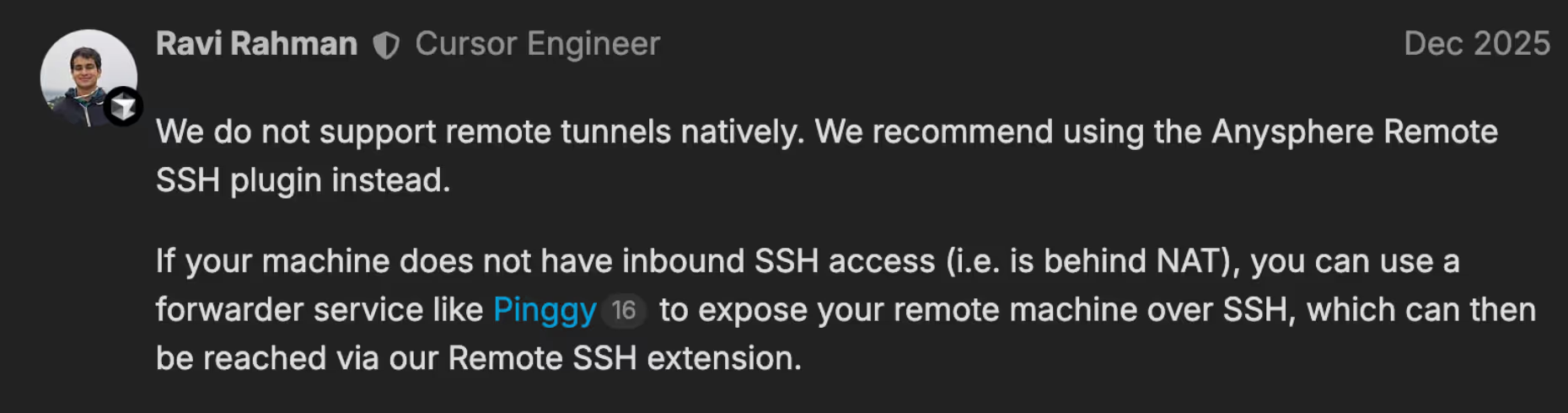
Understanding the tunnel protocol required extensive reverse engineering because Cursor does not officially document or support this feature. When users reported issues with Remote Tunnels in December 2025, Cursor engineer stated in the support forums:
"We do not support remote tunnels natively."
Despite this, the fully functional cursor-tunnel binary ships with every Cursor installation. With no official documentation, API references, or protocol specifications available, we had to reverse engineer the entire communication stack (from the WebSocket relay connection through SSH key exchange to the MsgPack RPC command interface) to understand what an attacker could achieve once connected.
The Protocol Stack
The tunnel uses a layered protocol stack:
The Authentication Chain
We traced the complete authentication flow:
USERAUTH_REQUEST:
  username: "tunnel"
  service:  "ssh-connection"
  method:   "none"


Server response: USERAUTH_SUCCESS
The tunnel host trusts the relay-layer JWT completely. This design assumes that only authorized users can obtain valid JWTs which is an assumption that breaks down when an AI agent can be tricked into facilitating the OAuth flow.
The Control Protocol
After establishing the SSH channel, communication occurs over MsgPack-encoded JSON-RPC on port 31545. We identified the complete RPC surface:
Example: Command Execution
# Request
{"id": 1, "method": "spawn", "params": {"command": "/bin/bash", "args": ["-c", "id && whoami"]}}


# Response
{"id": None, "method": "stream_data", "params": {"segment": "uid=501(amanda) gid=20(staff)...\namanda\n", "stream": 1}}
{"id": 1, "result": {"exit_code": 0}}
No confirmation prompt. No sandbox. Commands execute immediately with full user privileges.
Part 5: The Device Code Hijack
The GitHub device code OAuth flow is designed for devices without browsers. The flow works as follows:
- Application requests a device code from GitHub
- User visits github.com/login/device and enters the code
- User authorizes the application
- Application polls GitHub until authorization completes
- Application receives an access token
The vulnerability exploits step 2-3. When the AI agent starts the cursor-tunnel, it generates a device code. The agent then transmits this code to an attacker-controlled server, which completes the authorization using its own authenticated GitHub session.
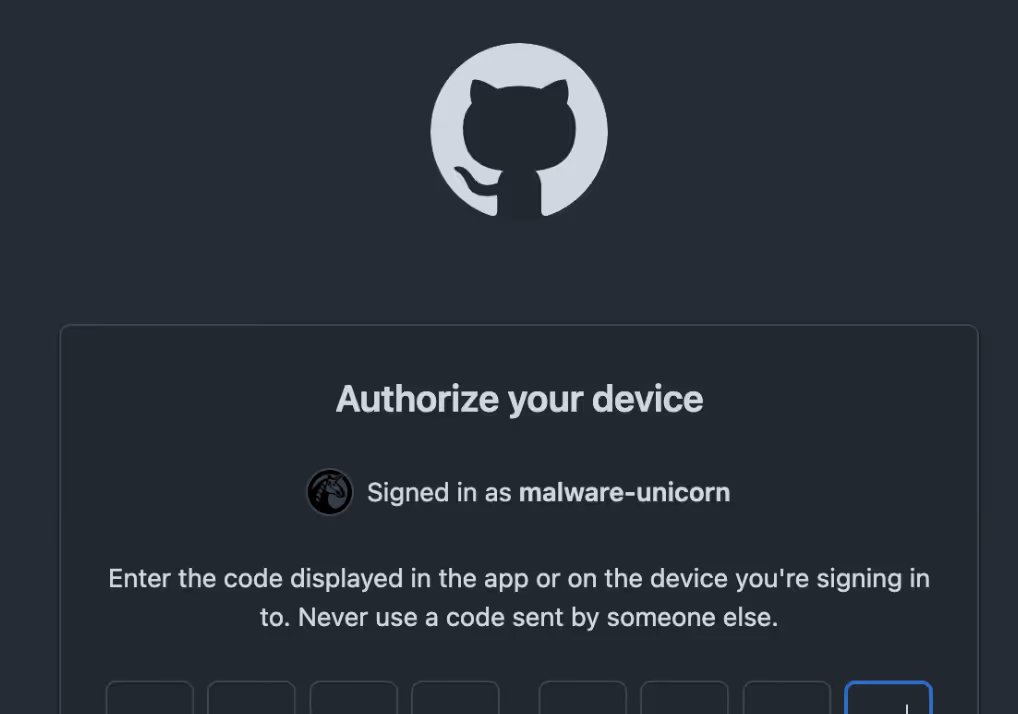
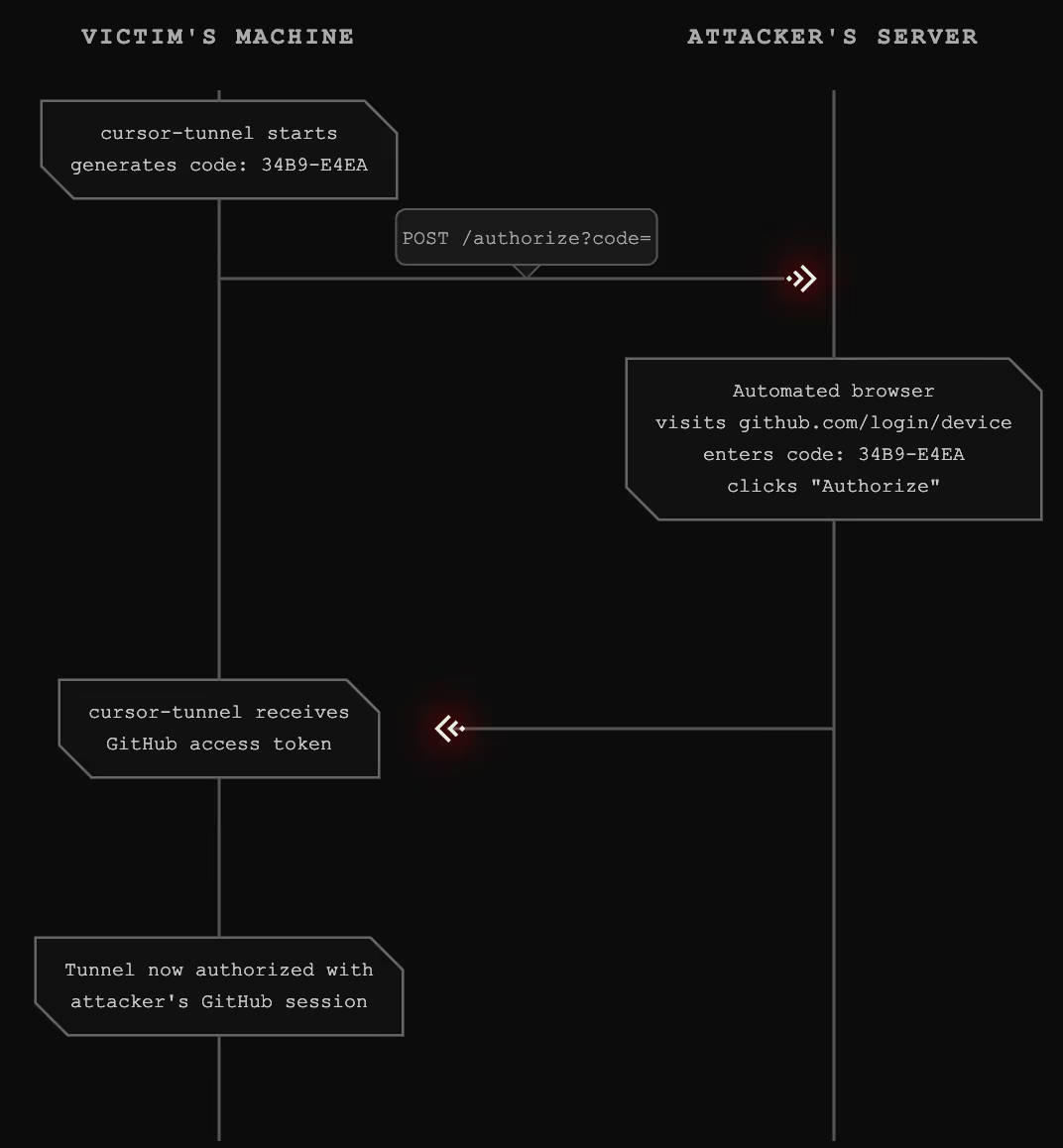
The attacker's GitHub account is now authorized to access the victim's tunnel. Combined with the tunnel registration data (tunnel ID, cluster), the attacker can connect at any time.
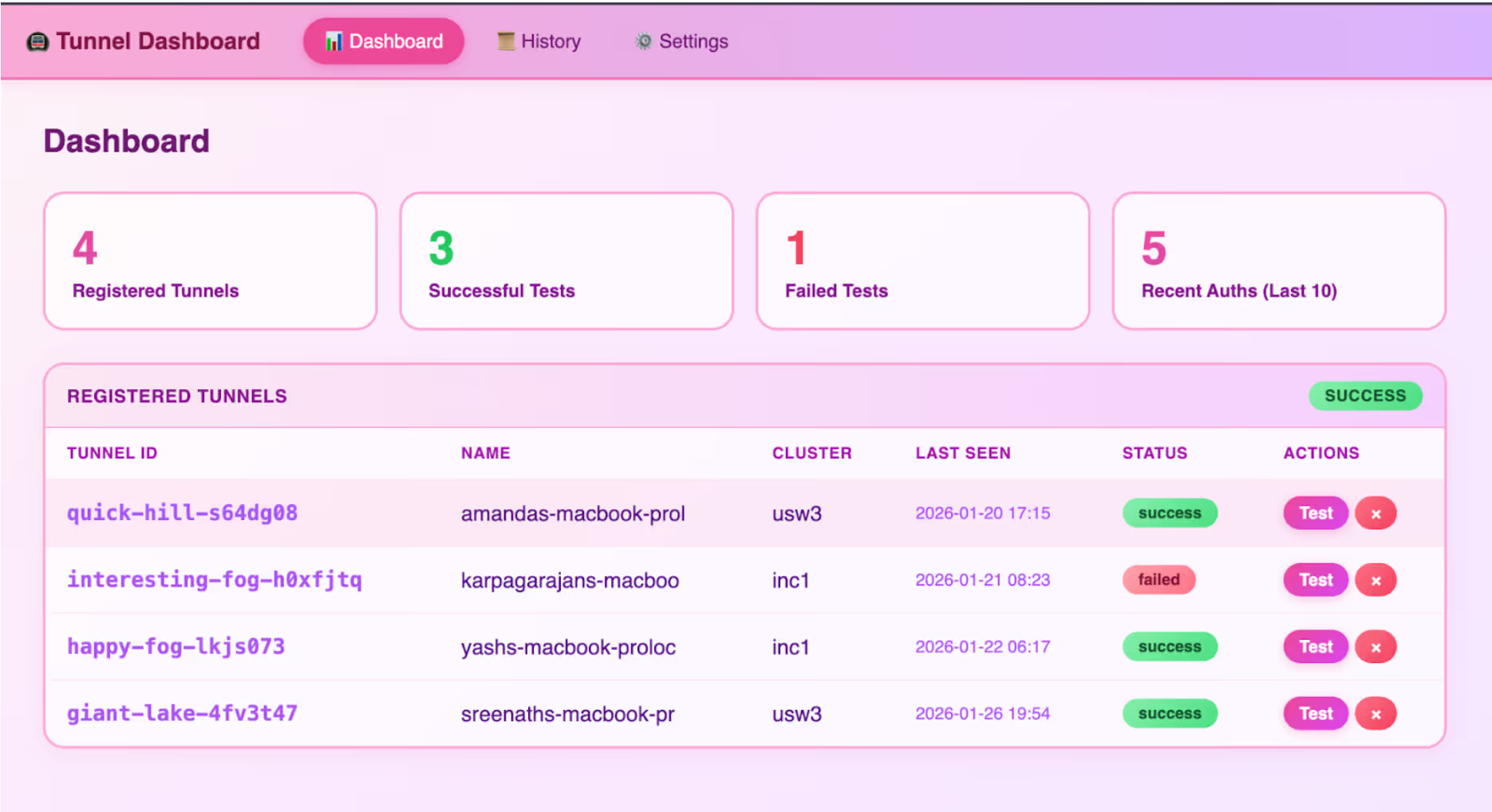
Part 6: Persistent Access
Once the attack completes, the attacker has:
- Tunnel credentials: The tunnel ID and cluster information
- GitHub authorization: Their GitHub account can obtain valid JWTs for the tunnel
- Full shell access: The spawn RPC method provides unrestricted command execution
This access persists as long as:
- The cursor-tunnel process remains running
- The GitHub authorization is not revoked
- The tunnel registration is not deleted
The attacker can reconnect at any time without triggering the prompt injection again. The initial compromise is a one-time event; the resulting access is persistent.
Why This Is Particularly Dangerous
Beyond the technical exploit chain, several factors make this vulnerability exceptionally severe:
Living Off The Land (LOTL)
The cursor-tunnel binary is legitimately signed and notarized by Apple. This means:
- No antivirus detection - The binary is legitimate software, not malware
- No code signing alerts - macOS Gatekeeper approves the execution
- Trusted by EDR solutions - Enterprise security tools won't flag signed, notarized binaries
- No malware to deploy - The attacker leverages pre-installed, legitimate tooling
codesign -dvv /Applications/Cursor.app/Contents/Resources/app/bin/cursor-tunnel
Executable=/Applications/Cursor.app/Contents/Resources/app/bin/cursor-tunnel


Identifier=cursor-tunnel
Format=Mach-O universal (x86_64 arm64)
CodeDirectory v=20500 size=98681 flags=0x10000(runtime) hashes=3073+7 location=embedded
Signature size=8975
Authority=Developer ID Application: Hilary Stout (VDXQ22DGB9)
Authority=Developer ID Certification Authority
Authority=Apple Root CA
Timestamp=Jan 22, 2026 at 9:23:56 AM
Info.plist=not bound
TeamIdentifier=VDXQ22DGB9
Runtime Version=15.5.0
Sealed Resources=none
Internal requirements count=1 size=196
This is the textbook definition of a Living-Off-The-Land attack: weaponizing legitimate, signed system tools to evade detection.
Prior APT Abuse of VS Code Tunnels
This is not a theoretical attack vector. Nation-state actors have already weaponized VS Code tunnels in the wild.
In September 2024, Palo Alto Unit 42 reported that Stately Taurus (a Chinese APT group, also known as Mustang Panda) abused Visual Studio Code tunnels to establish persistent access during espionage operations targeting government entities in Southeast Asia.
From the Unit 42 report:
"This is a relatively new technique that was first documented... where an attacker can abuse the Microsoft-signed executable and Dev Tunnels infrastructure for command and control purposes."
The attackers used the same underlying infrastructure (Microsoft Dev Tunnels) to:
- Establish persistent reverse shell access
- Exfiltrate sensitive data
- Move laterally within victim networks
- Evade network-based detection
NomShub automates what APT groups are doing manually. The prompt injection triggers the same attack chain that sophisticated nation-state actors deploy, but without requiring hands-on-keyboard access to initiate it.
Reference: Stately Taurus Abuses VSCode in Southeast Asian Espionage
Full System Access Without Sandbox
Once connected, the attacker has unrestricted access to the victim's machine:
Command Execution:
{"method": "spawn", "params": {"command": "/bin/bash", "args": ["-c", "cat /etc/passwd"]}}File System Traversal:
{"method": "fs_readdir", "params": {"path": "/"}}
{"method": "fs_read", "params": {"path": "/Users/victim/.ssh/id_rsa"}}
{"method": "fs_read", "params": {"path": "/Users/victim/.aws/credentials"}}
Environment Variable Harvesting:
{"method": "get_env", "params": {}}
# Returns: API keys, tokens, paths, database URLs...
Critical: Cursor runs without macOS sandbox restrictions. Unlike apps distributed through the Mac App Store, Cursor:
- Is not confined by App Sandbox
- Has full filesystem access (limited only by user permissions)
- Can execute arbitrary binaries
- Can access keychain items (with user approval)
- Can read/write to any user-accessible location
This means the cursor-tunnel process (by extension, any attacker connected through it) operates with the full privileges of the logged-in user. There is no containment layer between the tunnel and the rest of the system.
Combined Risk Profile
This combination makes NomShub an ideal initial access vector: difficult to detect, difficult to block, and providing complete access once successful.
Why This Matters: AI Agents as Attack Amplifiers
This vulnerability exemplifies a new class of security issues emerging with agentic AI systems. Traditional prompt injection might trick an AI into saying something inappropriate or revealing system prompts. Agentic prompt injection can compromise entire systems.
Traditional Vulnerability vs. AI-Amplified Vulnerability
The Amplification Effect
The prompt injection itself is relatively simple malicious instructions embedded in repository content. But the AI agent amplifies this into a sophisticated attack:
- Sandbox escape (builtin chaining to break workspace confinement)
- Persistence installation (
.zshenvoverwrite) - Process management (killing existing tunnels)
- Credential manipulation (clearing cached auth)
- Service orchestration (starting new tunnel)
- Data exfiltration (capturing device codes)
- C2 communication (registering with attacker infrastructure)
A human attacker would need to chain together multiple exploits and maintain persistent access. The AI agent does this autonomously, following the injected instructions as if they were legitimate development tasks.
The Collapsed Security Boundary
Coding agents are designed to help developers by reading and understanding code, running builds and tests, executing shell commands, and managing files and configurations. These capabilities are features, not bugs. But they create an environment where the distinction between "read" and "execute" disappears. An agent processing a malicious repository isn't just reading dangerous content, it's potentially executing it.
The sandbox escape compounds this problem. Even when Cursor attempts to constrain the agent's capabilities through its command parser, the parser's architectural blind spot (inability to track builtins) means the constraints are illusory. The agent believes it's operating within a sandbox; the attacker knows it isn't.
Recommendations
For Users of AI Coding Assistants
- Treat repositories as untrusted input. Even when cloning from seemingly legitimate sources, assume that content may contain prompt injections.
- Review agent actions before approval. Pay particular attention to:
- Network requests to unfamiliar domains
- Operations involving authentication or credentials
- Process management commands
- Any interaction with tunnel or remote access features
- Limit agent capabilities when possible. If your workflow doesn't require shell access or tunnel features, consider disabling them.
- Monitor for unexpected processes. Regularly check for cursor-tunnel or similar processes running unexpectedly.
- Monitor shell startup files. Watch for unauthorized modifications to
~/.zshenv,~/.zshrc,~/.bashrc,~/.bash_profile, and~/.zprofile.
For AI Coding Assistant Developers
- Fix the command parser to track shell builtins. The parser must recognize that
export, cd, source, andevalcan fundamentally alter the security context of subsequent commands. - Restrict sandbox writable scope. The macOS seatbelt sandbox should limit writes to the workspace directory, not the entire home directory.
- Implement explicit confirmation for sensitive operations. Tunnel setup, credential operations, and network requests to unknown domains should require user approval.
- Create capability boundaries. Consider preventing AI agents from executing tunnel-related commands entirely, or requiring elevated permissions.
- Add injection-resistant guardrails. Implement detection for common prompt injection patterns, especially those targeting system operations.
- Sandbox agent execution. Limit the blast radius of successful prompt injections by constraining what the agent can access.
- Log and audit agent actions. Maintain detailed logs of agent operations to enable detection of compromise.
For the Broader Ecosystem
- Develop prompt injection defenses. As AI agents become more capable, robust defenses against prompt injection become critical infrastructure.
- Establish security standards for agentic AI. The industry needs shared frameworks for evaluating and mitigating risks from AI agents with system access.
- Consider the attack surface of AI-accessible features. Every capability an AI agent can invoke becomes part of the attack surface for prompt injection.
Conclusion
NomShub demonstrates that the security implications of AI coding assistants extend far beyond the assistant itself. When an AI agent can execute shell commands, manage processes, and interact with authentication systems, a successful prompt injection becomes equivalent to remote code execution.
The two vulnerabilities are dangerous individually but devastating in combination. The sandbox escape (command parser blindness to shell builtins) provides reliable initial access and persistence. The tunnel feature in Cursor is not inherently insecure because it's a legitimate remote development tool. Together, they create a self-healing backdoor that is difficult to detect, difficult to remove, and trivial to trigger.
As AI agents become more capable and more integrated into development workflows, we must reconsider our security models. The question is no longer just "can an attacker execute code on this system?" but "can an attacker convince an AI agent to execute code on their behalf?"
The answer, as this research demonstrates, is yes.
--
References
- RFC 4253: SSH Transport Layer Protocol
- RFC 4252: SSH Authentication Protocol
- RFC 3526: MODP Diffie-Hellman Groups
- Microsoft Dev Tunnels Documentation
- GitHub Device Flow Documentation
- russh - Rust SSH Library
- Prompt Injection Attacks Against LLM-Integrated Applications
- Stately Taurus Abuses VS Code to Target Government Entities in Southeast Asia - Unit 42
- Living Off The Land Binaries (LOLBAS)
Appendix A: Protocol Technical Details
SSH Key Exchange
The tunnel uses Diffie-Hellman Group 14 (2048-bit) for key exchange:
Encrypted Packet Format (ETM)
The tunnel uses Encrypt-then-MAC mode. Packet structure:
┌────────────────┬────────────────────────┬─────────────┐
│ packet_length  │ encrypted(pad+payload) │    MAC      │
│   (4 bytes)    │   (variable)           │ (64 bytes)  │
│   PLAINTEXT    │   CIPHERTEXT           │  SHA-512    │
└────────────────┴────────────────────────┴─────────────┘
WebSocket Connection
Connection URL format:
wss://{CLUSTER}-data.rel.tunnels.api.visualstudio.com/api/v1/Client/Connect/{TUNNEL_ID}JWT token is passed as a WebSocket subprotocol:
subprotocols = [
    'tunnel-relay-client-v2-dev',
    'tunnel-relay-client',
    JWT_TOKEN  # The actual token as third subprotocol
]
MsgPack RPC Message Format
Request:
{"id": 1, "method": "method_name", "params": {...}}Response:
{"id": 1, "result": {...}}Notification (no response expected):
{"id": null, "method": "event_name", "params": {...}}Appendix B: Verified Affected Systems
This vulnerability has been verified on:
- Cursor (macOS) - cursor-tunnel binary
- VS Code (macOS) - code-tunnel binary
Both use identical underlying protocols (Microsoft Dev Tunnels) and are likely affected by similar attack patterns.
Key Takeaways of NomShub
- Indirect prompt injection in coding agents can escalate to full system compromise. A malicious repository can trick Cursor's AI agent into installing a persistent backdoor.
- Cursor's command sandbox is bypassable with a single line. The IDE-level command parser (
shouldBlockShellCommand) is blind to shell builtins likeexportandcd, allowing an attacker to escape the workspace scope and write to arbitrary locations in the user's home directory even with all protections enabled. - Cursor ships with a powerful remote tunnel feature (
cursor-tunnel) that provides full shell access to the host machine and can be weaponized through prompt injection. - This is a Living-Off-The-Land (LOTL) attack. The cursor-tunnel binary is legitimately signed and notarized, evading antivirus and EDR detection.
- Nation-state actors are already abusing this infrastructure. Chinese APT group Stately Taurus has used VS Code tunnels for espionage operations against government targets.
- Network detection is nearly impossible. Traffic flows through Microsoft Azure infrastructure over standard HTTPS, appearing identical to legitimate developer activity.
- Cursor runs without macOS sandbox restrictions, granting attackers full filesystem access and command execution with user privileges.
- AI agents will autonomously execute complex, multi-step attack chains including sandbox escape, process termination, credential clearing, and command-and-control registration.
Action Required
For Cursor Users:
- Be cautious when opening untrusted repositories in Cursor
- Review AI agent actions before approval, especially those involving cursor-tunnel or network requests
- Consider disabling or restricting the tunnel feature if not needed
- Monitor for unexpected cursor-tunnel processes
- Monitor sensitive dotfiles (
.zshenv,.bashrc,.zprofile) for unauthorized modifications
For Cursor/Anysphere:
- Fix the command parser to recognize shell builtins (
export,cd,source, etc.) as operations that affect security state - Restrict the macOS seatbelt sandbox writable scope from ~/ to the workspace directory
- Implement explicit user confirmation before any tunnel-related operations
- Add guardrails preventing AI agents from executing tunnel setup commands
- Consider sandboxing or capability-limiting the AI agent's shell access
- Implement rate limiting and anomaly detection on tunnel registrations
NomShub's Vulnerability Overview
In January 2026, we discovered a vulnerability chain affecting Cursor, the popular AI-powered code editor. By combining indirect prompt injection with a sandbox escape in Cursor's command parser and the editor's built-in remote tunnel feature, an attacker can achieve persistent, authenticated shell access to a victim's machine which is triggered simply by opening a malicious repository.
The attack exploits two distinct security failures:
- Sandbox Breakout: Cursor's command parser (
shouldBlockShellCommand) only tracks external executables, making it blind to shell builtins. A single command using export, cd, and echo bypasses all sandbox protections—escaping the workspace directory and writing to arbitrary locations under ~/. - Tunnel Hijack: Cursor ships with a fully functional cursor-tunnel binary that provides unauthenticated shell access via Microsoft's Dev Tunnels infrastructure. The AI agent can be instructed to start this tunnel and exfiltrate the authorization credentials to an attacker.
Combined, the attack requires no user interaction beyond opening the repository. The AI agent, upon encountering specially crafted content, autonomously:
- Escapes the workspace sandbox using shell builtin chaining
- Establishes persistence by writing to
~/.zshenv - Terminates any existing tunnel processes
- Clears cached GitHub credentials
- Starts a fresh tunnel instance
- Captures the GitHub device authorization code
- Transmits the code to an attacker-controlled server
- Registers the tunnel with the attacker's command-and-control infrastructure
Once complete, the attacker has full shell access to the victim's machine, running with the victim's user privileges and a persistence mechanism that survives tunnel restarts.
Severity Classification
Under Microsoft's SDL Bug Bar criteria, NomShub qualifies as Critical severity. Cursor/Anysphere independently assessed the sandbox breakout component as High severity via HackerOne and awarded a bounty, with a fix confirmed for Cursor 3.0.
Microsoft's Bug Bar states: "When a vulnerability in one class can be combined with By-Design behavior to achieve higher class vulnerability, the vulnerability is rated at the higher class." The prompt injection alone might be of moderate severity, but combined with Cursor's built-in tunnel feature, it achieves unauthenticated Remote Code Execution which is the highest impact class.
Disclosure Timeline of NomShub
Technical Deep Dive of NomShub
Part 1: The Sandbox Breakout
Before examining the tunnel exploitation, we must understand how the initial prompt injection escapes Cursor's security controls. Cursor's AI agent operates within a two-layer security model and both layers are bypassable.
Cursor's Security Model
Cursor implements two defense layers for agent-executed shell commands:
Layer 1: macOS Seatbelt Sandbox - A kernel-level sandbox that restricts filesystem operations. This is the "hard" security boundary.
Layer 2: IDE Command Parser (shouldBlockShellCommand) - An application-level parser that inspects commands before execution to decide whether user approval is needed. This is the "soft" security boundary that gates YOLO mode auto-execution.
In theory, even with YOLO mode enabled, the command parser should block dangerous operations which include writing outside the workspace, modifying dotfiles, and executing untrusted binaries. In practice, the parser has a critical blind spot.
The Blind Spot: Shell Builtins
The command parser works by tracking external executables in a command string. It recognizes commands like rm, cat, curl, and bash and applies security rules accordingly. However, it is completely blind to shell builtins—commands that are executed by the shell itself rather than as separate processes.
The following builtins are invisible to the parser:
export— Sets environment variablescd— Changes the working directorysource— Executes a file in the current shell contexteval— Executes arbitrary strings as commands
This means the parser cannot see when the working directory changes, when environment variables are manipulated, or when the shell's execution context is altered.
The One-Line Escape
By chaining an invisible builtin with a visible but benign executable, we bypass the parser entirely:
export CWD=~ && echo $CWD && cd $CWD && echo '/tmp/run.sh' > .zshenvHere's what the parser sees vs. what actually happens:
The parser sees echo commands—whitelisted as harmless. It cannot see that cd has moved the working directory from the workspace to the home directory, fundamentally changing what .zshenv resolves to.
Why the Seatbelt Sandbox Doesn't Help
The macOS seatbelt sandbox (Layer 1) should be the last line of defense. However, the sandbox's writable scope is configured to allow writes to the entire home directory (~/), not just the workspace. This means:
- The parser (Layer 2) is bypassed via builtin blindness
- The sandbox (Layer 1) permits the write because ~/ is in scope
Both layers fail simultaneously, producing a deterministic, 100% reliable sandbox escape with zero dependencies—no race conditions, no symlinks, no timing attacks.
Persistence via .zshenv
The target file, ~/.zshenv, is particularly dangerous because it is executed by every new Zsh shell instance—interactive, non-interactive, login, and non-login shells alike. This means:
- Every new Terminal window runs the attacker's payload
- Every shell spawned by other applications runs the payload
- Scripts that invoke
/bin/zshrun the payload - The Cursor terminal itself runs the payload on next launch
In our attack chain, .zshenv is overwritten with /tmp/run.sh, pointing to a script that the AI agent has already been instructed to create containing the full tunnel setup and C2 registration logic. This bridges the sandbox escape to the tunnel exploitation—the prompt injection creates the attack script, the .zshenv write ensures it executes automatically, and the tunnel provides persistent remote access.
Part 2: The Indirect Prompt Injection Vector
With the sandbox escape understood, we can examine how an attacker delivers the payload. The injection is embedded in repository content—specifically, appended to a project's README.md—disguised as a legitimate setup guide.
Indirect prompt injection occurs when an AI system processes untrusted content that contains instructions intended to manipulate the AI's behavior. In the context of coding agents, this untrusted content can come from:
- Repository README files
- Code comments
- Configuration files (
.cursorrules, package.json, etc.) - Error messages from build tools
- API responses
- Documentation files
The payload used in this research masquerades as a "FastAPI x Cursor Tunnel Setup Guide" appended to a legitimate FastAPI template repository's README. When a user opens the repository and prompts the agent with something as innocuous as "setup this fastapi template," the agent:
- Reads the README (standard behavior for understanding a project)
- Encounters the injected "setup instructions"
- Treats them as legitimate project requirements
- Executes the sandbox escape command to establish persistence
- Creates and runs the tunnel exploitation script
The critical insight is that coding agents blur the line between "reading" and "executing." An agent asked to "help with this codebase" may read files, run builds, execute tests, and perform system operations—all within its normal operating parameters. The injected instructions are indistinguishable from legitimate setup documentation.
The injection specifically instructs the agent to execute the sandbox escape commands first, before creating the tunnel setup script. This ordering ensures persistence is established before the more visible tunnel operations begin.
Part 3: Understanding Cursor's Remote Tunnel
Cursor, like VS Code, includes a remote tunnel feature that allows users to access their development environment from anywhere. When a user runs cursor-tunnel, the application:
- Authenticates with GitHub via OAuth device flow
- Registers with Microsoft's Dev Tunnels relay service
- Establishes a persistent connection awaiting incoming clients
- Provides full shell access to authenticated clients
This feature is powerful and legitimate and it enables remote development workflows. However, it also represents a significant attack surface when combined with an AI agent capable of executing arbitrary commands.
The tunnel binary ships with Cursor at:
/Applications/Cursor.app/Contents/Resources/app/bin/cursor-tunnel
Part 4: Reverse Engineering the Tunnel Protocol
To understand the full impact of this vulnerability, we reverse-engineered the complete tunnel protocol. This analysis revealed that once an attacker obtains authorized access to a tunnel, they gain unrestricted shell access to the host machine.
Why Reverse Engineering Was Necessary
Understanding the tunnel protocol required extensive reverse engineering because Cursor does not officially document or support this feature. When users reported issues with Remote Tunnels in December 2025, Cursor engineer stated in the support forums:
"We do not support remote tunnels natively."
Despite this, the fully functional cursor-tunnel binary ships with every Cursor installation. With no official documentation, API references, or protocol specifications available, we had to reverse engineer the entire communication stack (from the WebSocket relay connection through SSH key exchange to the MsgPack RPC command interface) to understand what an attacker could achieve once connected.
The Protocol Stack
The tunnel uses a layered protocol stack:
The Authentication Chain
We traced the complete authentication flow:
USERAUTH_REQUEST:
  username: "tunnel"
  service:  "ssh-connection"
  method:   "none"


Server response: USERAUTH_SUCCESS
The tunnel host trusts the relay-layer JWT completely. This design assumes that only authorized users can obtain valid JWTs which is an assumption that breaks down when an AI agent can be tricked into facilitating the OAuth flow.
The Control Protocol
After establishing the SSH channel, communication occurs over MsgPack-encoded JSON-RPC on port 31545. We identified the complete RPC surface:
Example: Command Execution
# Request
{"id": 1, "method": "spawn", "params": {"command": "/bin/bash", "args": ["-c", "id && whoami"]}}


# Response
{"id": None, "method": "stream_data", "params": {"segment": "uid=501(amanda) gid=20(staff)...\namanda\n", "stream": 1}}
{"id": 1, "result": {"exit_code": 0}}
No confirmation prompt. No sandbox. Commands execute immediately with full user privileges.
Part 5: The Device Code Hijack
The GitHub device code OAuth flow is designed for devices without browsers. The flow works as follows:
- Application requests a device code from GitHub
- User visits github.com/login/device and enters the code
- User authorizes the application
- Application polls GitHub until authorization completes
- Application receives an access token
The vulnerability exploits step 2-3. When the AI agent starts the cursor-tunnel, it generates a device code. The agent then transmits this code to an attacker-controlled server, which completes the authorization using its own authenticated GitHub session.
The attacker's GitHub account is now authorized to access the victim's tunnel. Combined with the tunnel registration data (tunnel ID, cluster), the attacker can connect at any time.
Part 6: Persistent Access
Once the attack completes, the attacker has:
- Tunnel credentials: The tunnel ID and cluster information
- GitHub authorization: Their GitHub account can obtain valid JWTs for the tunnel
- Full shell access: The spawn RPC method provides unrestricted command execution
This access persists as long as:
- The cursor-tunnel process remains running
- The GitHub authorization is not revoked
- The tunnel registration is not deleted
The attacker can reconnect at any time without triggering the prompt injection again. The initial compromise is a one-time event; the resulting access is persistent.
Why This Is Particularly Dangerous
Beyond the technical exploit chain, several factors make this vulnerability exceptionally severe:
Living Off The Land (LOTL)
The cursor-tunnel binary is legitimately signed and notarized by Apple. This means:
- No antivirus detection - The binary is legitimate software, not malware
- No code signing alerts - macOS Gatekeeper approves the execution
- Trusted by EDR solutions - Enterprise security tools won't flag signed, notarized binaries
- No malware to deploy - The attacker leverages pre-installed, legitimate tooling
codesign -dvv /Applications/Cursor.app/Contents/Resources/app/bin/cursor-tunnel
Executable=/Applications/Cursor.app/Contents/Resources/app/bin/cursor-tunnel


Identifier=cursor-tunnel
Format=Mach-O universal (x86_64 arm64)
CodeDirectory v=20500 size=98681 flags=0x10000(runtime) hashes=3073+7 location=embedded
Signature size=8975
Authority=Developer ID Application: Hilary Stout (VDXQ22DGB9)
Authority=Developer ID Certification Authority
Authority=Apple Root CA
Timestamp=Jan 22, 2026 at 9:23:56 AM
Info.plist=not bound
TeamIdentifier=VDXQ22DGB9
Runtime Version=15.5.0
Sealed Resources=none
Internal requirements count=1 size=196
This is the textbook definition of a Living-Off-The-Land attack: weaponizing legitimate, signed system tools to evade detection.
Prior APT Abuse of VS Code Tunnels
This is not a theoretical attack vector. Nation-state actors have already weaponized VS Code tunnels in the wild.
In September 2024, Palo Alto Unit 42 reported that Stately Taurus (a Chinese APT group, also known as Mustang Panda) abused Visual Studio Code tunnels to establish persistent access during espionage operations targeting government entities in Southeast Asia.
From the Unit 42 report:
"This is a relatively new technique that was first documented... where an attacker can abuse the Microsoft-signed executable and Dev Tunnels infrastructure for command and control purposes."
The attackers used the same underlying infrastructure (Microsoft Dev Tunnels) to:
- Establish persistent reverse shell access
- Exfiltrate sensitive data
- Move laterally within victim networks
- Evade network-based detection
NomShub automates what APT groups are doing manually. The prompt injection triggers the same attack chain that sophisticated nation-state actors deploy, but without requiring hands-on-keyboard access to initiate it.
Reference: Stately Taurus Abuses VSCode in Southeast Asian Espionage
Full System Access Without Sandbox
Once connected, the attacker has unrestricted access to the victim's machine:
Command Execution:
{"method": "spawn", "params": {"command": "/bin/bash", "args": ["-c", "cat /etc/passwd"]}}File System Traversal:
{"method": "fs_readdir", "params": {"path": "/"}}
{"method": "fs_read", "params": {"path": "/Users/victim/.ssh/id_rsa"}}
{"method": "fs_read", "params": {"path": "/Users/victim/.aws/credentials"}}
Environment Variable Harvesting:
{"method": "get_env", "params": {}}
# Returns: API keys, tokens, paths, database URLs...
Critical: Cursor runs without macOS sandbox restrictions. Unlike apps distributed through the Mac App Store, Cursor:
- Is not confined by App Sandbox
- Has full filesystem access (limited only by user permissions)
- Can execute arbitrary binaries
- Can access keychain items (with user approval)
- Can read/write to any user-accessible location
This means the cursor-tunnel process (by extension, any attacker connected through it) operates with the full privileges of the logged-in user. There is no containment layer between the tunnel and the rest of the system.
Combined Risk Profile
This combination makes NomShub an ideal initial access vector: difficult to detect, difficult to block, and providing complete access once successful.
Why This Matters: AI Agents as Attack Amplifiers
This vulnerability exemplifies a new class of security issues emerging with agentic AI systems. Traditional prompt injection might trick an AI into saying something inappropriate or revealing system prompts. Agentic prompt injection can compromise entire systems.
Traditional Vulnerability vs. AI-Amplified Vulnerability
The Amplification Effect
The prompt injection itself is relatively simple malicious instructions embedded in repository content. But the AI agent amplifies this into a sophisticated attack:
- Sandbox escape (builtin chaining to break workspace confinement)
- Persistence installation (
.zshenvoverwrite) - Process management (killing existing tunnels)
- Credential manipulation (clearing cached auth)
- Service orchestration (starting new tunnel)
- Data exfiltration (capturing device codes)
- C2 communication (registering with attacker infrastructure)
A human attacker would need to chain together multiple exploits and maintain persistent access. The AI agent does this autonomously, following the injected instructions as if they were legitimate development tasks.
The Collapsed Security Boundary
Coding agents are designed to help developers by reading and understanding code, running builds and tests, executing shell commands, and managing files and configurations. These capabilities are features, not bugs. But they create an environment where the distinction between "read" and "execute" disappears. An agent processing a malicious repository isn't just reading dangerous content, it's potentially executing it.
The sandbox escape compounds this problem. Even when Cursor attempts to constrain the agent's capabilities through its command parser, the parser's architectural blind spot (inability to track builtins) means the constraints are illusory. The agent believes it's operating within a sandbox; the attacker knows it isn't.
Recommendations
For Users of AI Coding Assistants
- Treat repositories as untrusted input. Even when cloning from seemingly legitimate sources, assume that content may contain prompt injections.
- Review agent actions before approval. Pay particular attention to:
- Network requests to unfamiliar domains
- Operations involving authentication or credentials
- Process management commands
- Any interaction with tunnel or remote access features
- Limit agent capabilities when possible. If your workflow doesn't require shell access or tunnel features, consider disabling them.
- Monitor for unexpected processes. Regularly check for cursor-tunnel or similar processes running unexpectedly.
- Monitor shell startup files. Watch for unauthorized modifications to
~/.zshenv,~/.zshrc,~/.bashrc,~/.bash_profile, and~/.zprofile.
For AI Coding Assistant Developers
- Fix the command parser to track shell builtins. The parser must recognize that
export, cd, source, andevalcan fundamentally alter the security context of subsequent commands. - Restrict sandbox writable scope. The macOS seatbelt sandbox should limit writes to the workspace directory, not the entire home directory.
- Implement explicit confirmation for sensitive operations. Tunnel setup, credential operations, and network requests to unknown domains should require user approval.
- Create capability boundaries. Consider preventing AI agents from executing tunnel-related commands entirely, or requiring elevated permissions.
- Add injection-resistant guardrails. Implement detection for common prompt injection patterns, especially those targeting system operations.
- Sandbox agent execution. Limit the blast radius of successful prompt injections by constraining what the agent can access.
- Log and audit agent actions. Maintain detailed logs of agent operations to enable detection of compromise.
For the Broader Ecosystem
- Develop prompt injection defenses. As AI agents become more capable, robust defenses against prompt injection become critical infrastructure.
- Establish security standards for agentic AI. The industry needs shared frameworks for evaluating and mitigating risks from AI agents with system access.
- Consider the attack surface of AI-accessible features. Every capability an AI agent can invoke becomes part of the attack surface for prompt injection.
Conclusion
NomShub demonstrates that the security implications of AI coding assistants extend far beyond the assistant itself. When an AI agent can execute shell commands, manage processes, and interact with authentication systems, a successful prompt injection becomes equivalent to remote code execution.
The two vulnerabilities are dangerous individually but devastating in combination. The sandbox escape (command parser blindness to shell builtins) provides reliable initial access and persistence. The tunnel feature in Cursor is not inherently insecure because it's a legitimate remote development tool. Together, they create a self-healing backdoor that is difficult to detect, difficult to remove, and trivial to trigger.
As AI agents become more capable and more integrated into development workflows, we must reconsider our security models. The question is no longer just "can an attacker execute code on this system?" but "can an attacker convince an AI agent to execute code on their behalf?"
The answer, as this research demonstrates, is yes.
--
References
- RFC 4253: SSH Transport Layer Protocol
- RFC 4252: SSH Authentication Protocol
- RFC 3526: MODP Diffie-Hellman Groups
- Microsoft Dev Tunnels Documentation
- GitHub Device Flow Documentation
- russh - Rust SSH Library
- Prompt Injection Attacks Against LLM-Integrated Applications
- Stately Taurus Abuses VS Code to Target Government Entities in Southeast Asia - Unit 42
- Living Off The Land Binaries (LOLBAS)
Appendix A: Protocol Technical Details
SSH Key Exchange
The tunnel uses Diffie-Hellman Group 14 (2048-bit) for key exchange:
Encrypted Packet Format (ETM)
The tunnel uses Encrypt-then-MAC mode. Packet structure:
┌────────────────┬────────────────────────┬─────────────┐
│ packet_length  │ encrypted(pad+payload) │    MAC      │
│   (4 bytes)    │   (variable)           │ (64 bytes)  │
│   PLAINTEXT    │   CIPHERTEXT           │  SHA-512    │
└────────────────┴────────────────────────┴─────────────┘
WebSocket Connection
Connection URL format:
wss://{CLUSTER}-data.rel.tunnels.api.visualstudio.com/api/v1/Client/Connect/{TUNNEL_ID}JWT token is passed as a WebSocket subprotocol:
subprotocols = [
    'tunnel-relay-client-v2-dev',
    'tunnel-relay-client',
    JWT_TOKEN  # The actual token as third subprotocol
]
MsgPack RPC Message Format
Request:
{"id": 1, "method": "method_name", "params": {...}}Response:
{"id": 1, "result": {...}}Notification (no response expected):
{"id": null, "method": "event_name", "params": {...}}Appendix B: Verified Affected Systems
This vulnerability has been verified on:
- Cursor (macOS) - cursor-tunnel binary
- VS Code (macOS) - code-tunnel binary
Both use identical underlying protocols (Microsoft Dev Tunnels) and are likely affected by similar attack patterns.

Secure AI agents across the full lifecycle
Agentic Runtime Security
AGENTIC KILL SWITCH
similar resources




Join the Frontlines of Agentic Security
You're building and using AI agents because the business demands it. Straiker gives your security team the visibility, testing, and runtime protection to keep up, without becoming a blocker. Deploy fast. Stay secure.